Reducing Manual Work in Employee Benefits Operations
How we transformed a friction-filled benefits system into an intelligent platform serving 6,000+ global
employees, reducing operational costs by 45% while unlocking $2.8M in revenue.
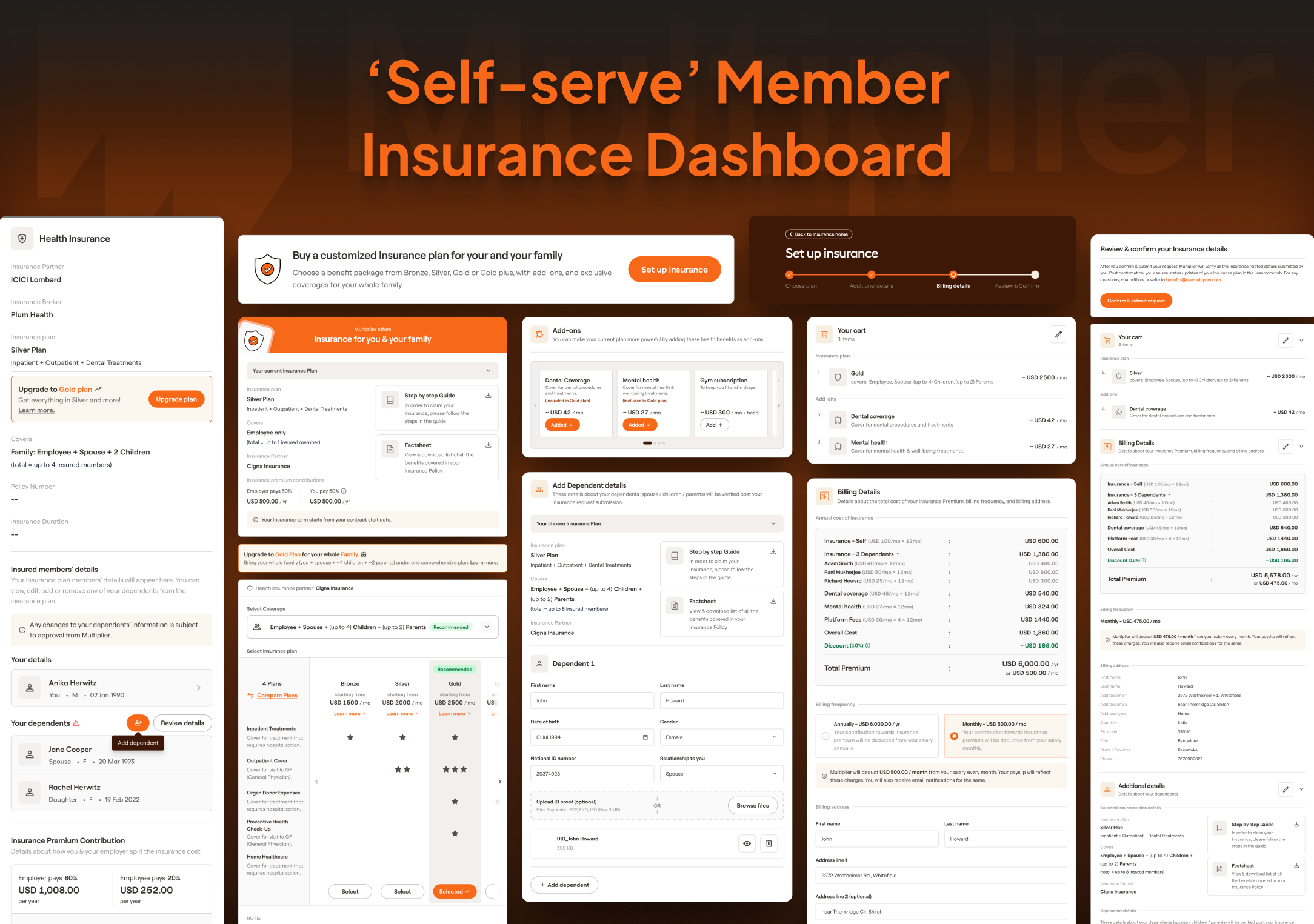
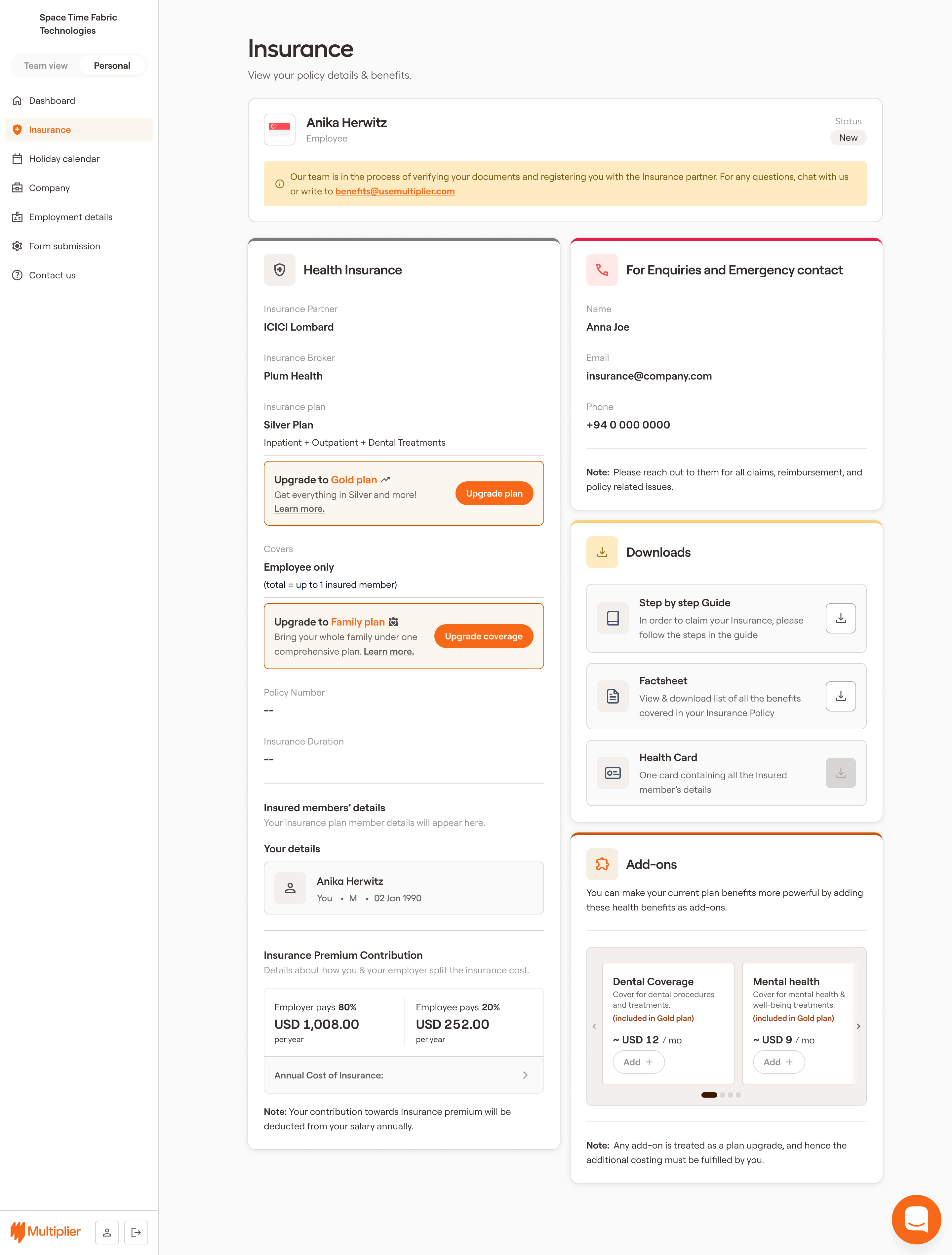
The new self-served benefits platform empowers employees to manage their insurance independently, eliminating the need for manual intervention by operations teams and significantly improving the user experience.
Timeline
Phase 1: Q2 2024
Phase 2 & 3: Q4 2024 & Q1 2025
My
Role
Sr. Product Designer (Design Owner)
Platform
Web Dashboard
Stakeholders
Design Manager Principal PM
Executive Summary
I led the redesign of Multiplier’s benefits platform to reduce operational dependency
and enable employees to manage their insurance independently.
At the time, most insurance workflows — from adding dependents to updating plans — were
handled manually by operations teams. This led to delays, frequent errors, and a fragmented user
experience.
Direct Business Impact
high operational overhead from repetitive
manual tasks
claim rejections caused by inconsistent
or
incomplete data
missed revenue opportunities from
uninsured
and underinsured members
A significant portion of the user base remained:
~45%uninsured
~57%on basic plans, limiting both
coverage and revenue potential
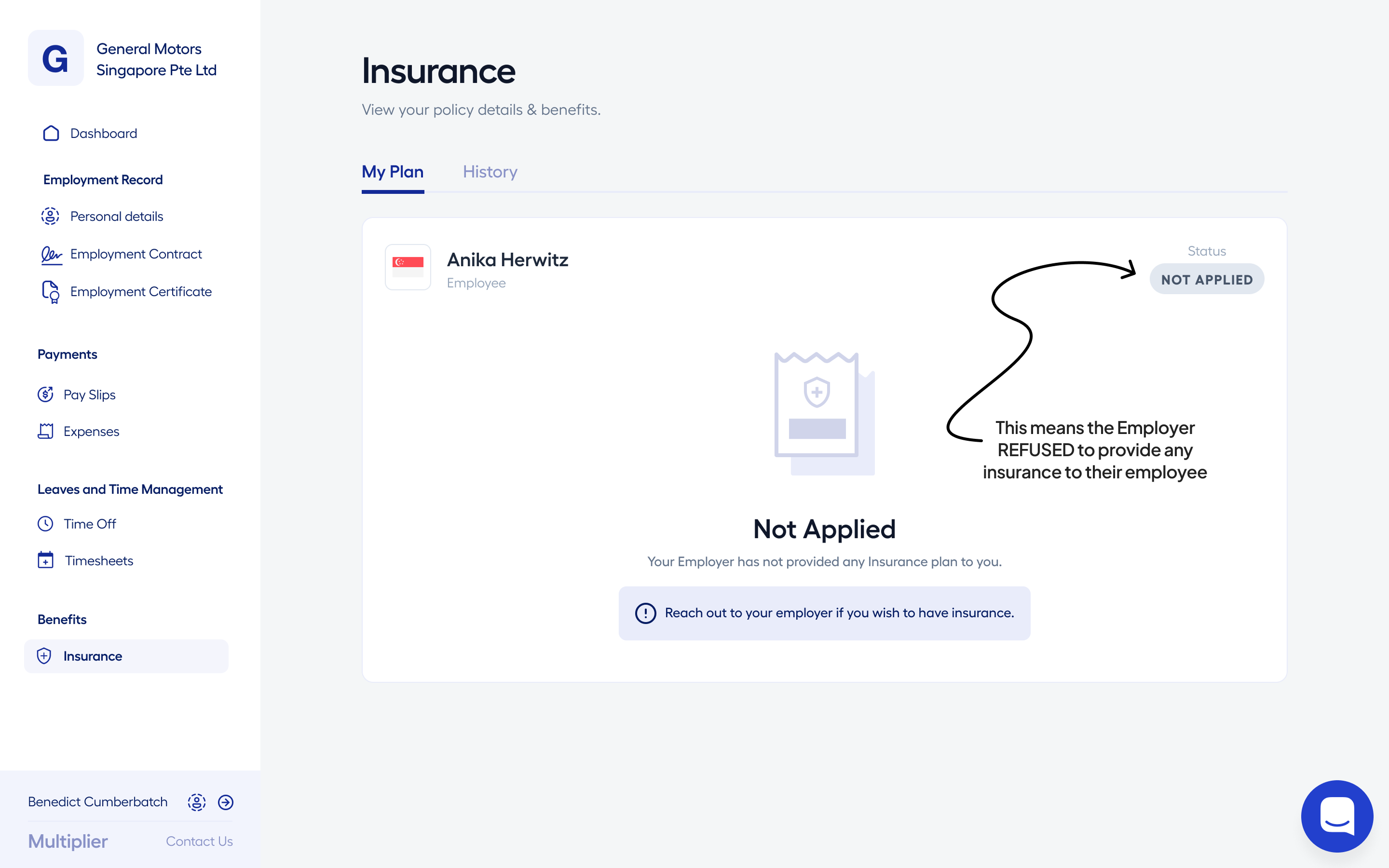
Data from a survey of 500+ employees revealed that the primary reason for being uninsured was
"not applying" for insurance, highlighting the need for a more intuitive and accessible benefits
management system.
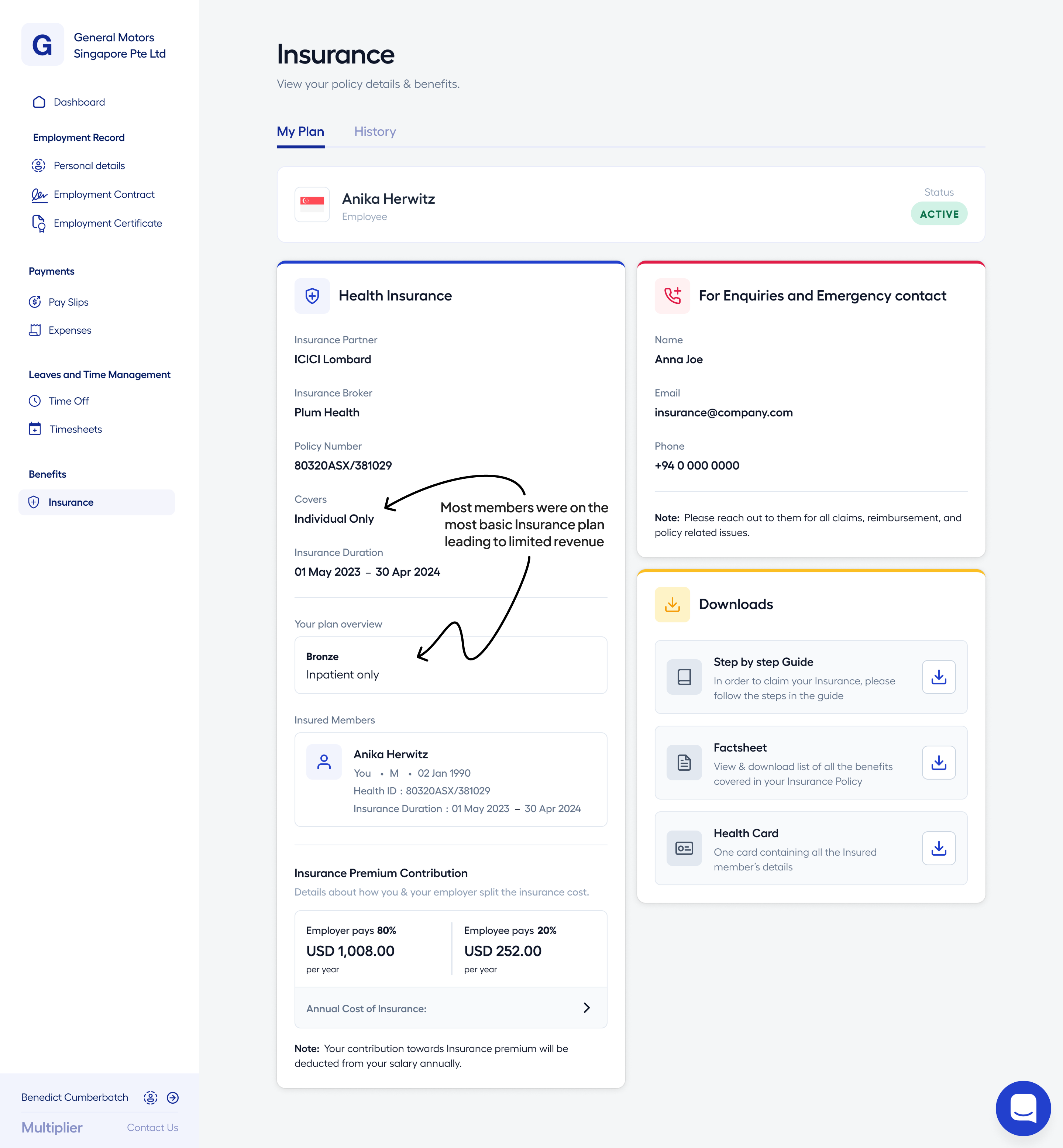
Analysis of insurance plan adoption showed that a majority of members were enrolled in basic
"Bronze" plans with individual coverage, indicating a significant opportunity to improve plan
adoption and increase revenue by making it easier for employees to explore and select more
comprehensive coverage options.
Instead of patching individual flows, I focused on designing a self-serve system that
could:
reduce manual effort
improve data accuracy
give users control over their benefits
unlock revenue through better plan
adoption
The Outcome
45% reduction in operational overhead
$2.8M revenue opportunity unlocked from ~1,850
uninsured members
Significant reduction in data errors, claim failures, and support dependency
Context
Insurance at Multiplier serves a dual role:
a core employee benefit
a key driver for retention and revenue
The platform supports 6,000+ employees globally, with insurance coverage
spanning multiple countries, partners, and dependent configurations.
The system, however, was built around a rigid onboarding
model.
Insurance decisions were made during onboarding, after which:
employees couldn’t modify their plans
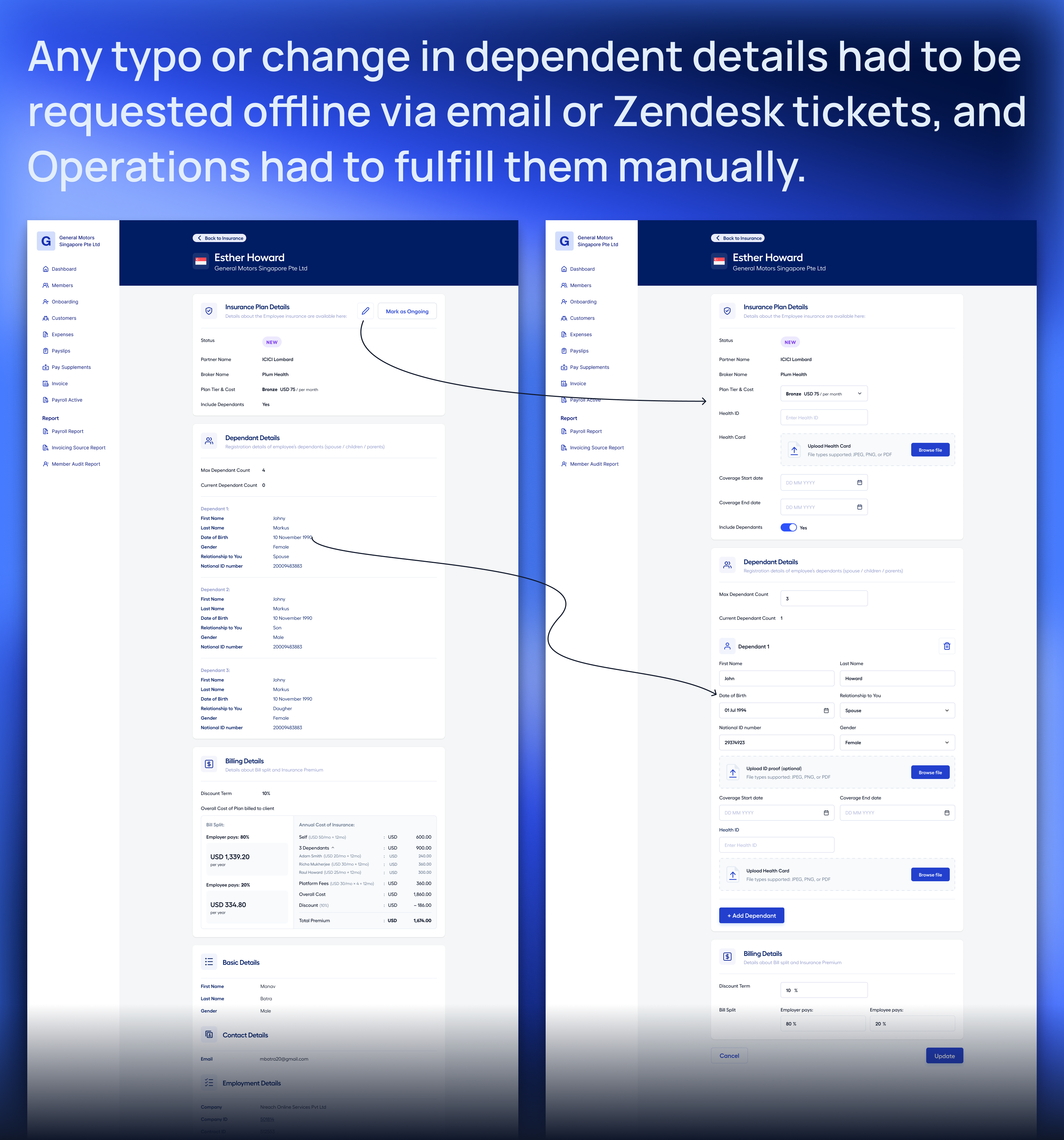
dependent updates required manual
intervention
most changes had to go through support or
operations teams
This created a system that worked at onboarding, but didn’t scale
with real-world needs.
As a result, routine actions like updating dependents, modifying plans,
or resolving errors became operational tasks instead of user actions — increasing dependency on ops
and slowing down the overall experience.
The manual handling of routine insurance actions led to significant operational overhead,
increased chances of errors, and a fragmented user experience, ultimately impacting employee
satisfaction and retention.
The Problem
As I analyzed the system, three
interconnected issues became clear — all stemming from the absence of a self-serve platform.
1. Heavy Operational
Dependency
Most insurance workflows were handled manually by operations
teams, including:
activating insurance
adding or updating dependents
handling retroactive enrollments and corrections
This created:
delays in processing
increased workload on operations teams
growing operational costs
As the user base scaled, these inefficiencies scaled with it —
making the system increasingly difficult to manage.
2. Data Inconsistencies Leading to
Failures
Dependent data was frequently incorrect or incomplete.
Common issues included:
inconsistent date formats (e.g., MM-DD-YYYY vs.
DD-MM-YYYY)
missing or invalid fields
incomplete dependent information across regions
This led to:
claim rejections and processing delays
repeated correction cycles between users and operations
increased support load and user frustration
Over time, this directly impacted trust in the platform.
3. Missed Revenue
Opportunities
A large portion of users were either:
uninsured (~45%), or
on basic plans (~57%)
The system lacked mechanisms to:
encourage plan upgrades
enable self-serve purchases
provide personalized plan recommendations
As a result, users remained underinsured, and the platform
missed significant revenue potential.
The system wasn’t just inefficient — it was limiting
growth.
Understanding the
System
As I dug deeper into the system, a clear
pattern emerged —
the platform wasn’t designed for user control, It was built around: ops-driven execution, not user-driven
interaction.
Employees had very little agency.
Even basic actions required:
raising a support request
waiting for operations to process it
going through back-and-forth communication
This created a reinforcing
loop:
users depended on ops
ops became a bottleneck
manual handling increased the likelihood of errors
The system scaled operational load instead of reducing it.
What the Data Revealed
To validate these patterns, I looked at recurring support queries and
offline requests.
Offline Requests & User
Signals:
Across client and employee communication, a few recurring issues stood
out:
Dependent addition errors leading to repeated corrections
Plan dissatisfaction due to lack of flexibility post-onboarding
Support Query Breakdown
(Zendesk):
A significant portion of support tickets clustered around a few areas:
31.39%Health ID cards and plan
understanding
16.18%Dependent additions
7.12%Claims-related queries
3.34%Data corrections
These weren’t edge cases — they were systemic issues.
Key Insight
Most of these problems traced back to the same root cause:
Dependent management and plan updates were manual and error-prone.
Critical information wasn’t easily accessible to users.
The system entirely lacked self-serve capabilities.
What looked like multiple issues were actually symptoms
of the same underlying problem.
My Role & Scope
I led the design of the self-serve benefits experience across web (and
partially mobile for Phase 1).
My focus was
on:
identifying high-impact points across the benefits lifecycle
structuring a solution that could scale without increasing complexity
aligning product, engineering, and operations teams
"The challenge wasn’t just designing better flows.
It was deciding what to unlock first without destabilizing the system."
Approach
Given the complexity, I approached this as a phased system transformation, not a one-time redesign.
Instead of solving everything at once, I structured the solution into
three stages:
/01
Fix data
accuracy issues
improving data reliability first
/02
Enable core
self-serve actions
then introducing user control
/03
Unlock plan
flexibility and revenue opportunities
finally expanding into revenue capabilities
The goal was to shift the system from ops-dependent to user-driven — without breaking existing workflows.
A phased approach allowed us to deliver value incrementally while managing risk and complexity.
Process Flow
Architecture
An interactive map of the automated benefits operation flow. Zoom and pan to explore the system
architecture.
Loading
Canvas...
Interact with the FigJam board above. Use your trackpad to pan and pinch to zoom.
Key Decisions
Given the scale of operational dependency, I approached this as a staged
transformation rather than a single redesign.
The goal was to shift the system from ops-driven to user-driven — without breaking existing workflows.
1. Started with data
accuracy before enabling self-serve
Before giving users control, I needed to ensure the underlying data was
reliable.
I introduced:
validation layers for dependent data (e.g., date formats, mandatory fields)
guided correction flows to help users fix existing errors
ops review before final sync with insurance partners
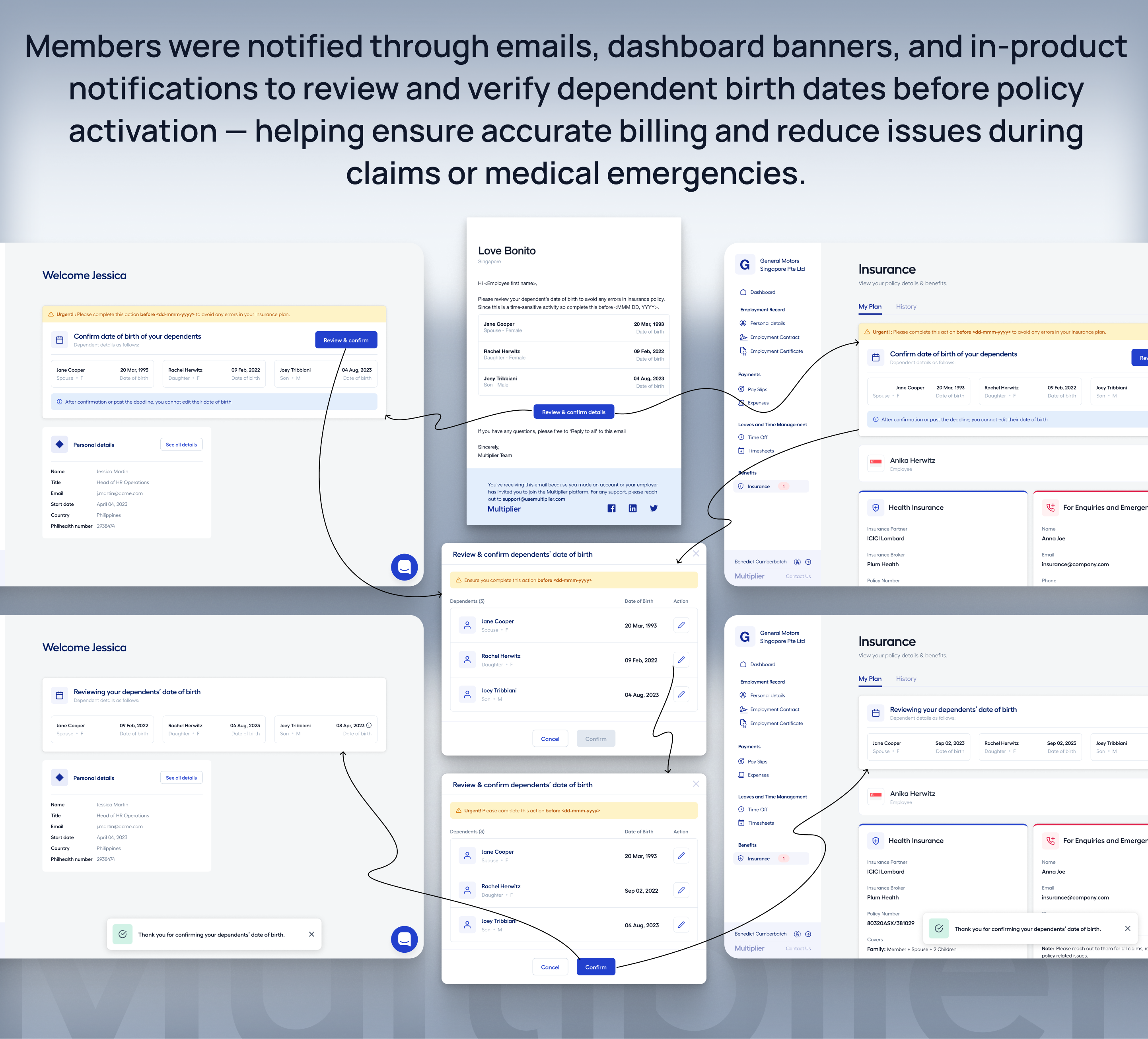
Users were prompted
through:
dashboard banners and notifications
guided forms with real-time validation
This reduced claim failures and created a reliable foundation for
self-serve actions.
Ensuring data accuracy was a critical first step before enabling any self-serve capabilities.
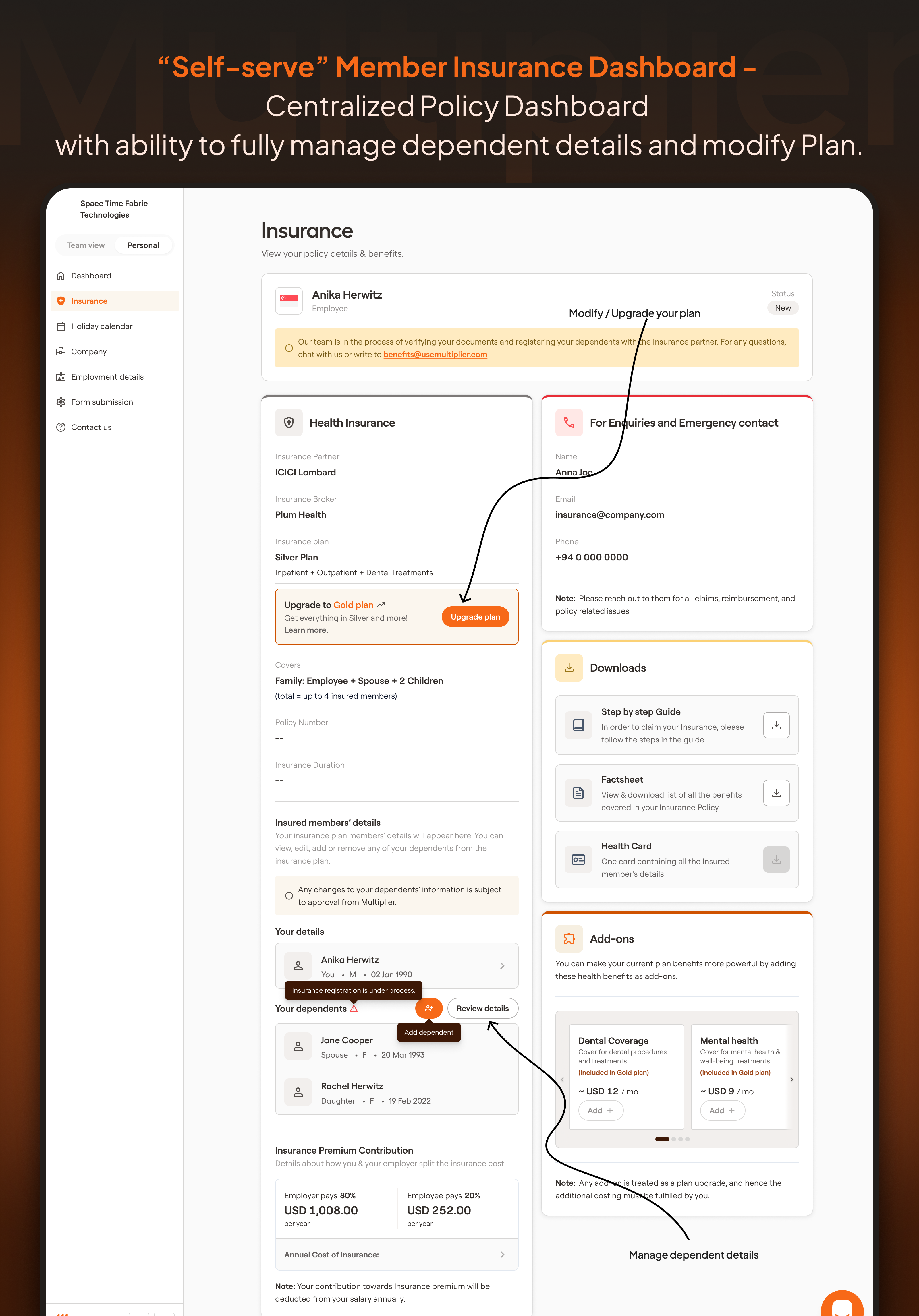
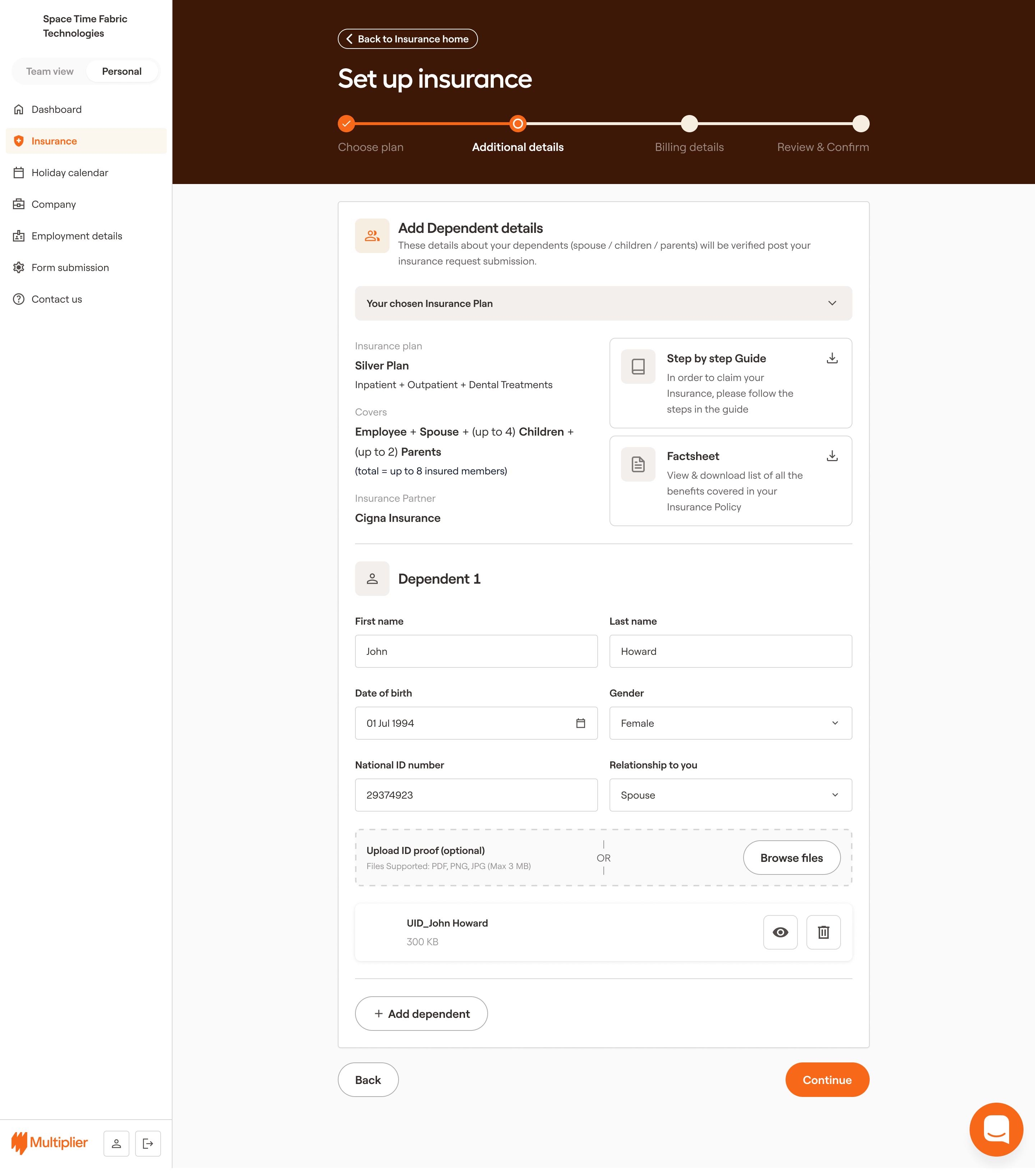
2. Enabled dependent
management as the first self-serve layer
Support data showed that a large portion of requests were related to
dependent updates.
So I prioritized enabling
users to:
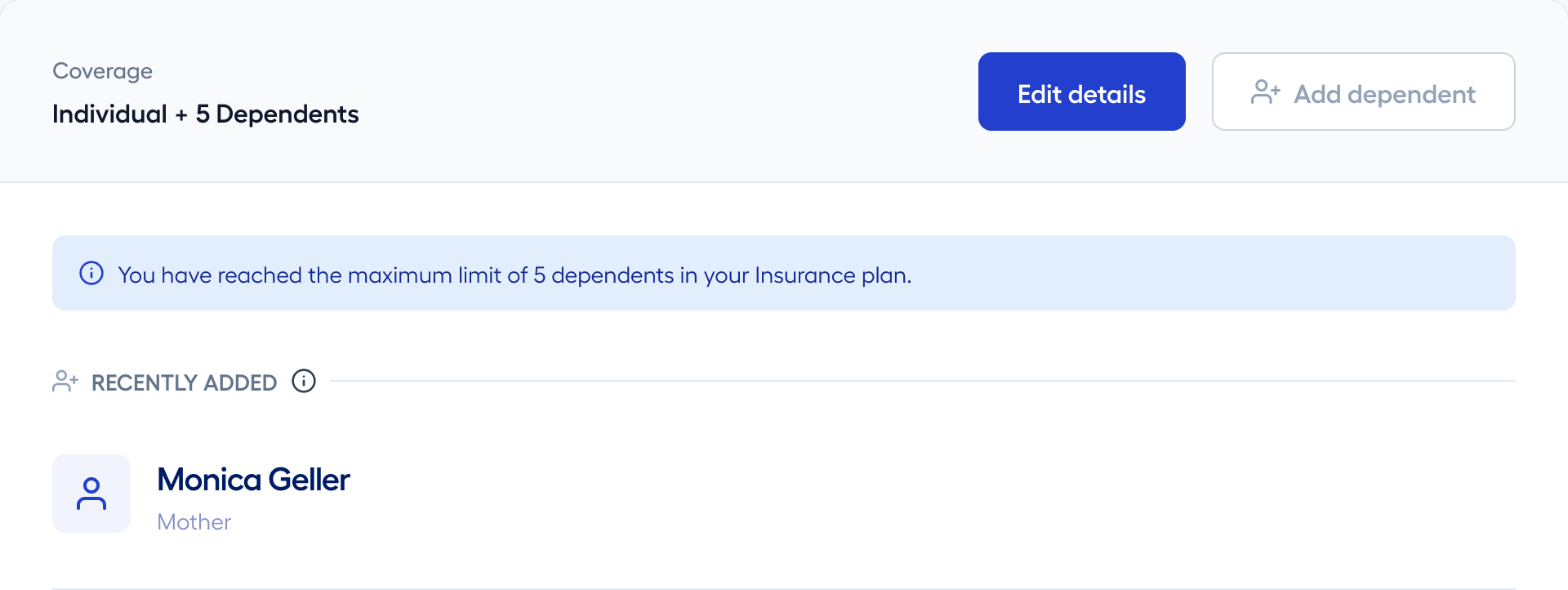
add dependents
remove dependents
update dependent details
This included:
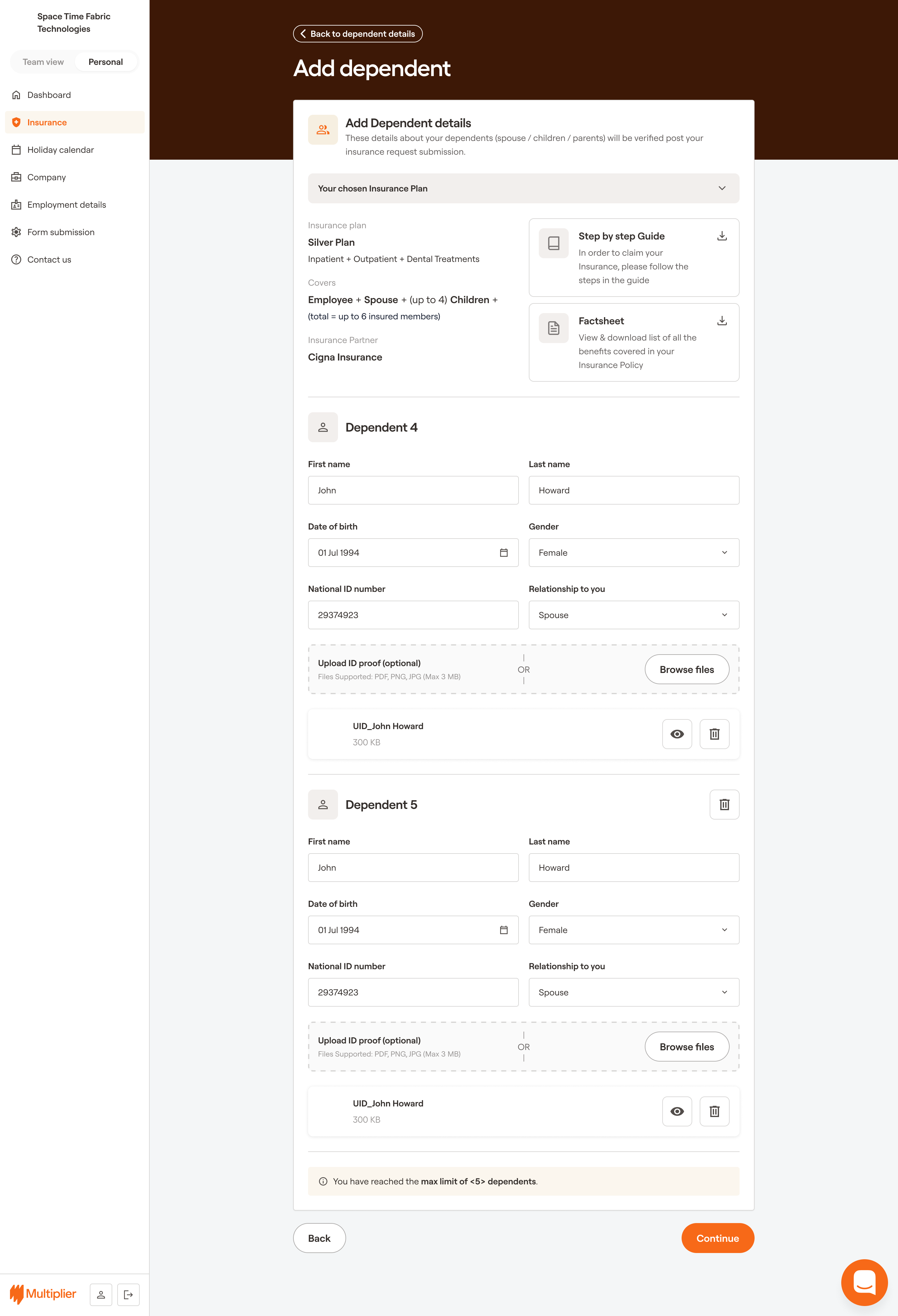
structured forms for capturing required information
real-time validation to prevent errors
clear workflows for submission and approval
This immediately reduced support load and gave users direct control over
a high-friction area.
Users were prompted to manage their dependents through dashboard banners and notifications
on Dashboard and Insurance pages.
Enabling dependent management was a high-impact first step that reduced support load and
gave users direct control over a critical area.
Real-time validation helps prevent errors and ensures data integrity.
While working on this project, the Multiplier Design team
introduced a new brand language and style system, which was gradually adopted across
all subsequent workflows and interfaces.
3. Introduced a full
self-serve insurance system
Once data reliability and dependent management were stable, I expanded
into plan-level control.
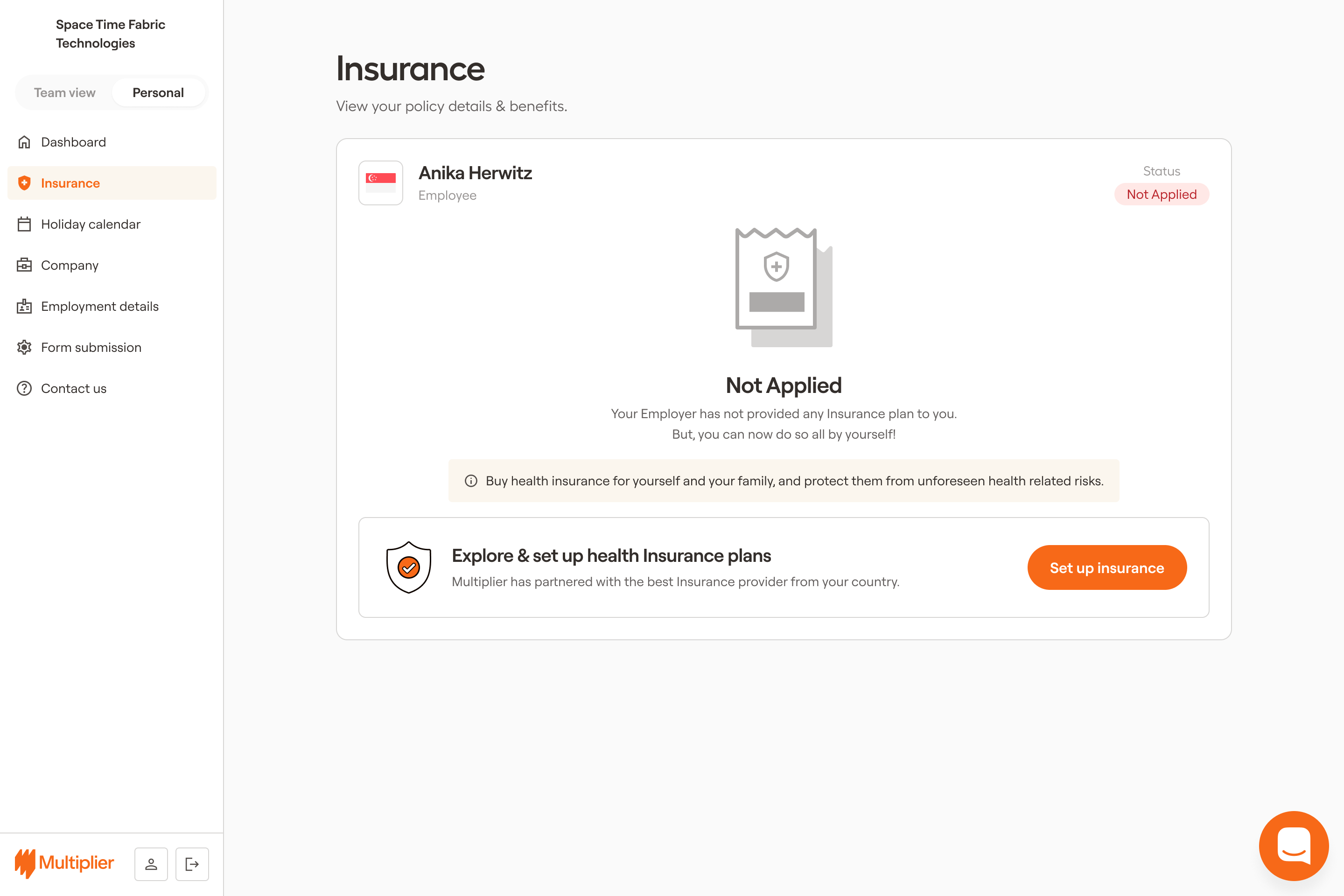
I enabled users with NO
INSURANCE to:
setup and buy Insurance during defined windows
explore available plans with detailed comparisons
upgrade or modify coverage
purchase add-ons and additional benefits
The experience included:
guided navigation for plan selection
structured comparisons across plans
clear enrollment flows with confirmation and system feedback
This shifted the system from ops-managed decisions to user-driven
control.
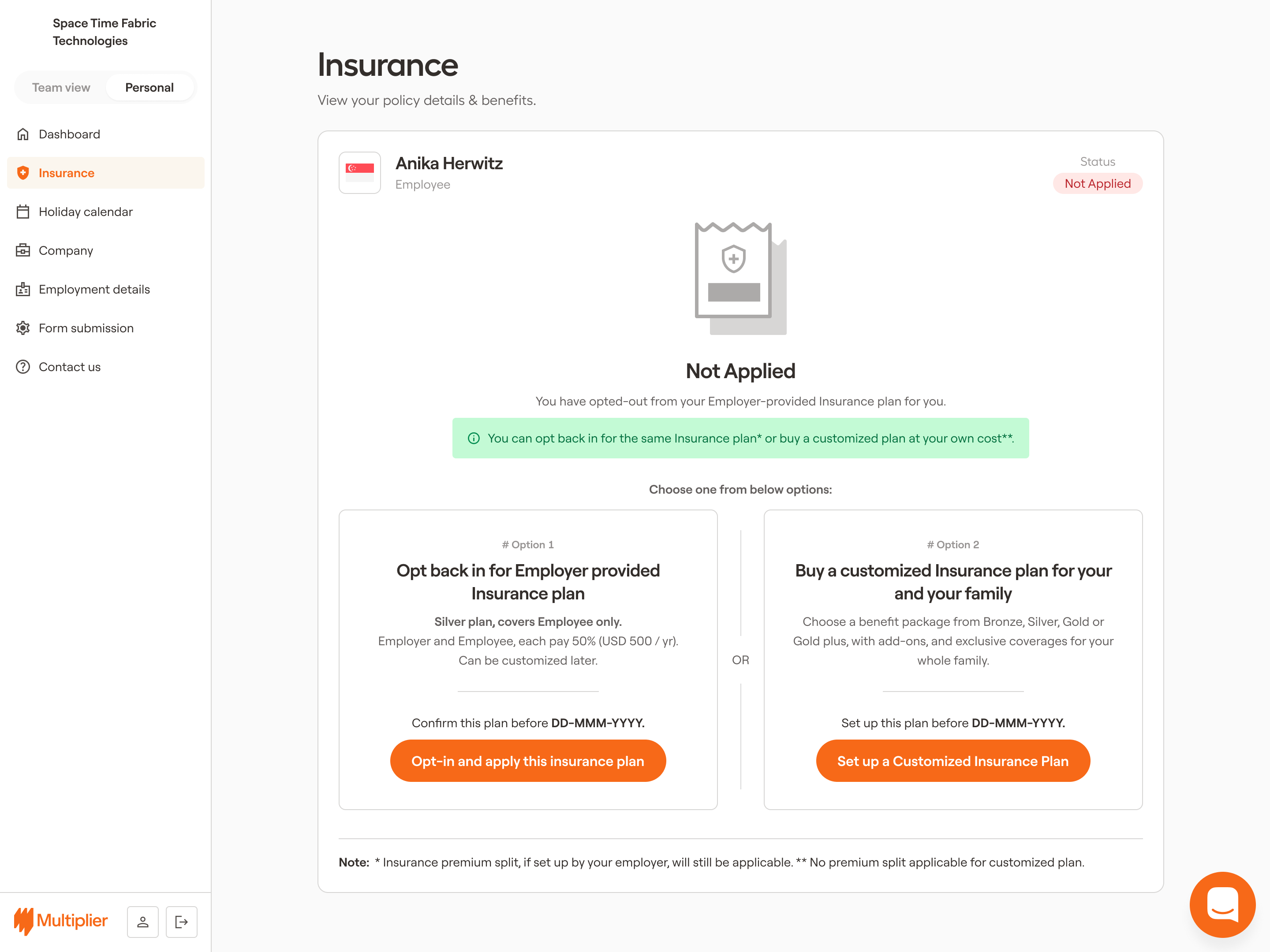
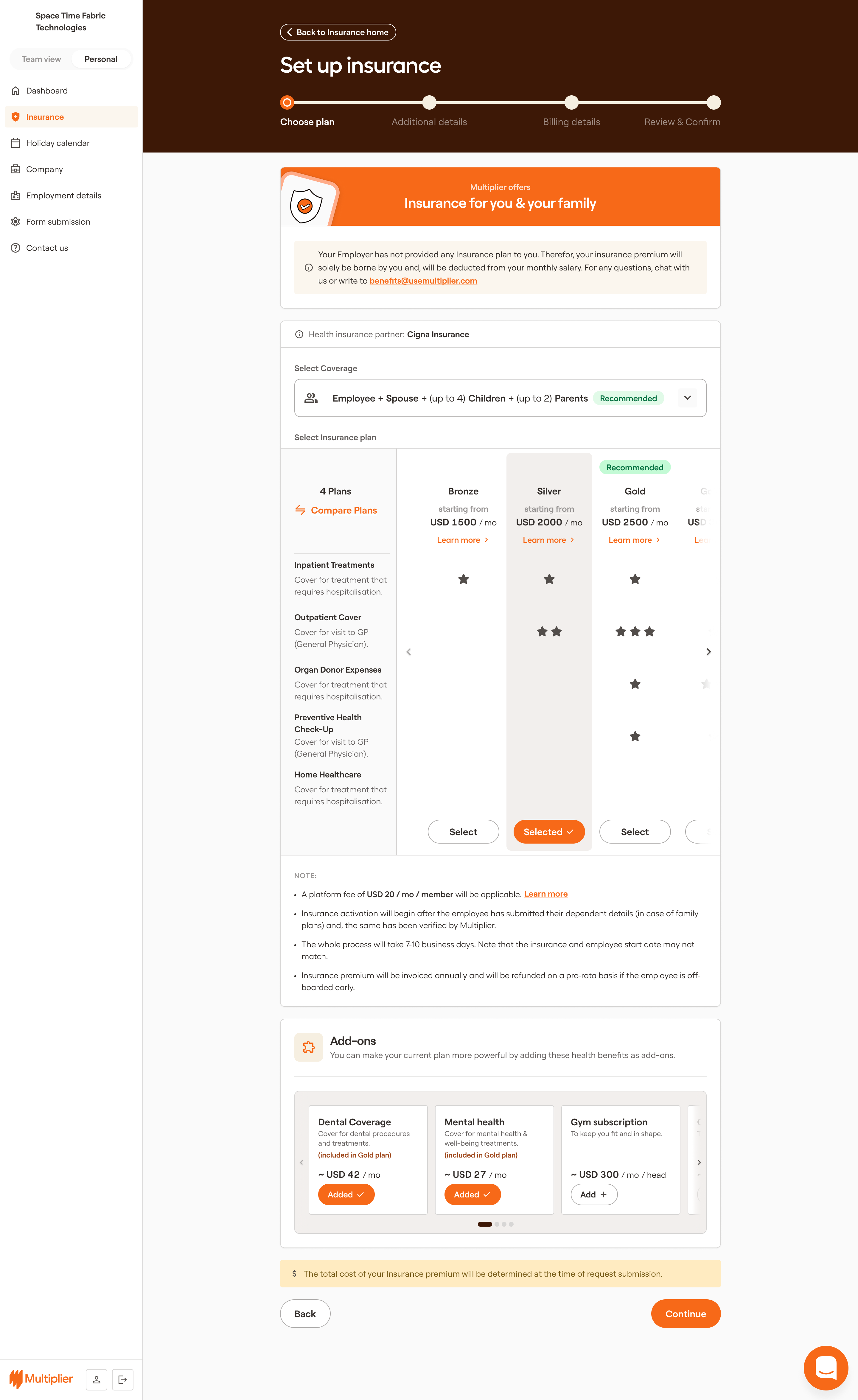
CASE 1: Users without insurance were guided through a structured setup flow to select and
enroll in plans.
CASE 2: Users who opted out of insurance were provided with a clear path to re-enroll or
manage their coverage before a deadline.
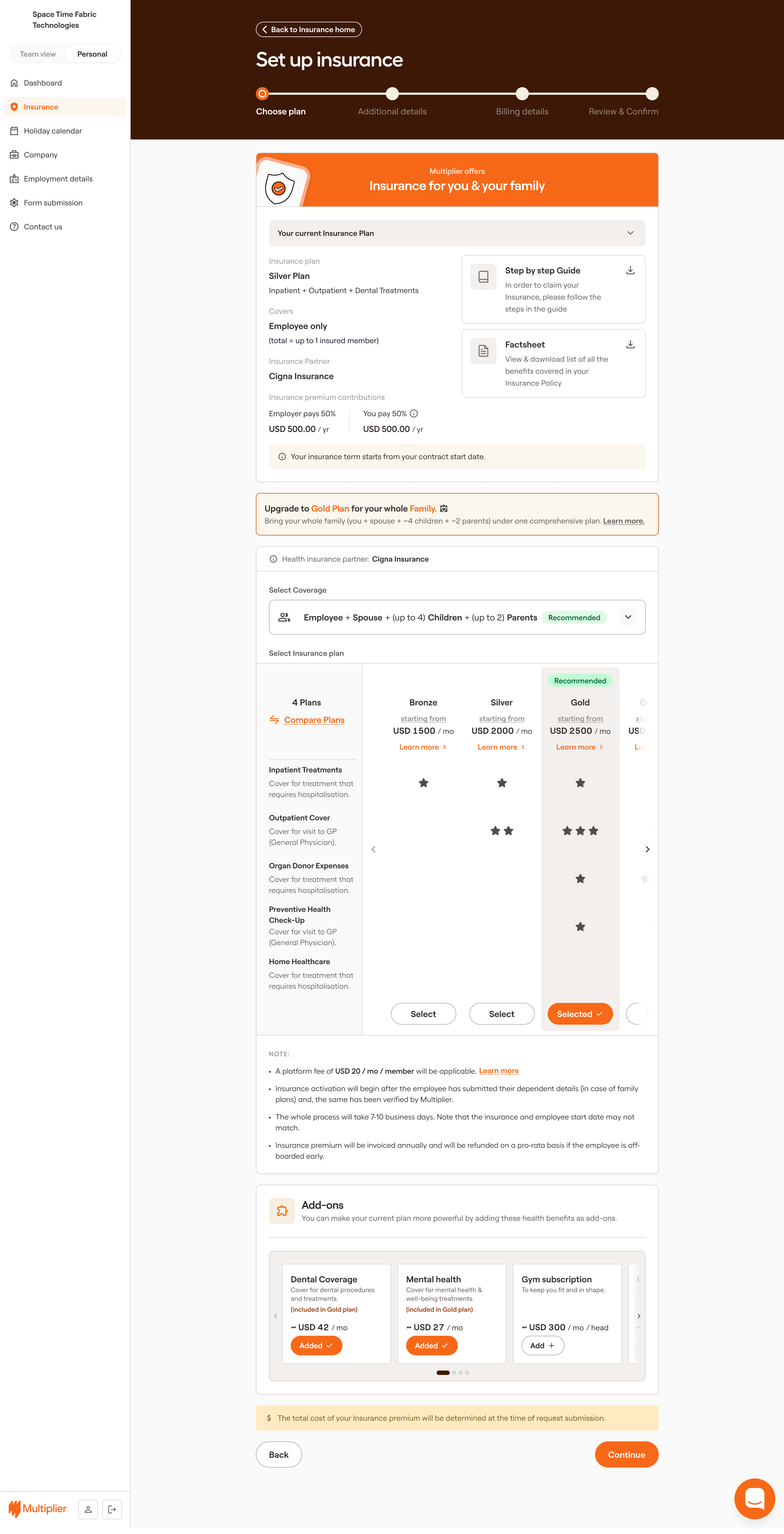
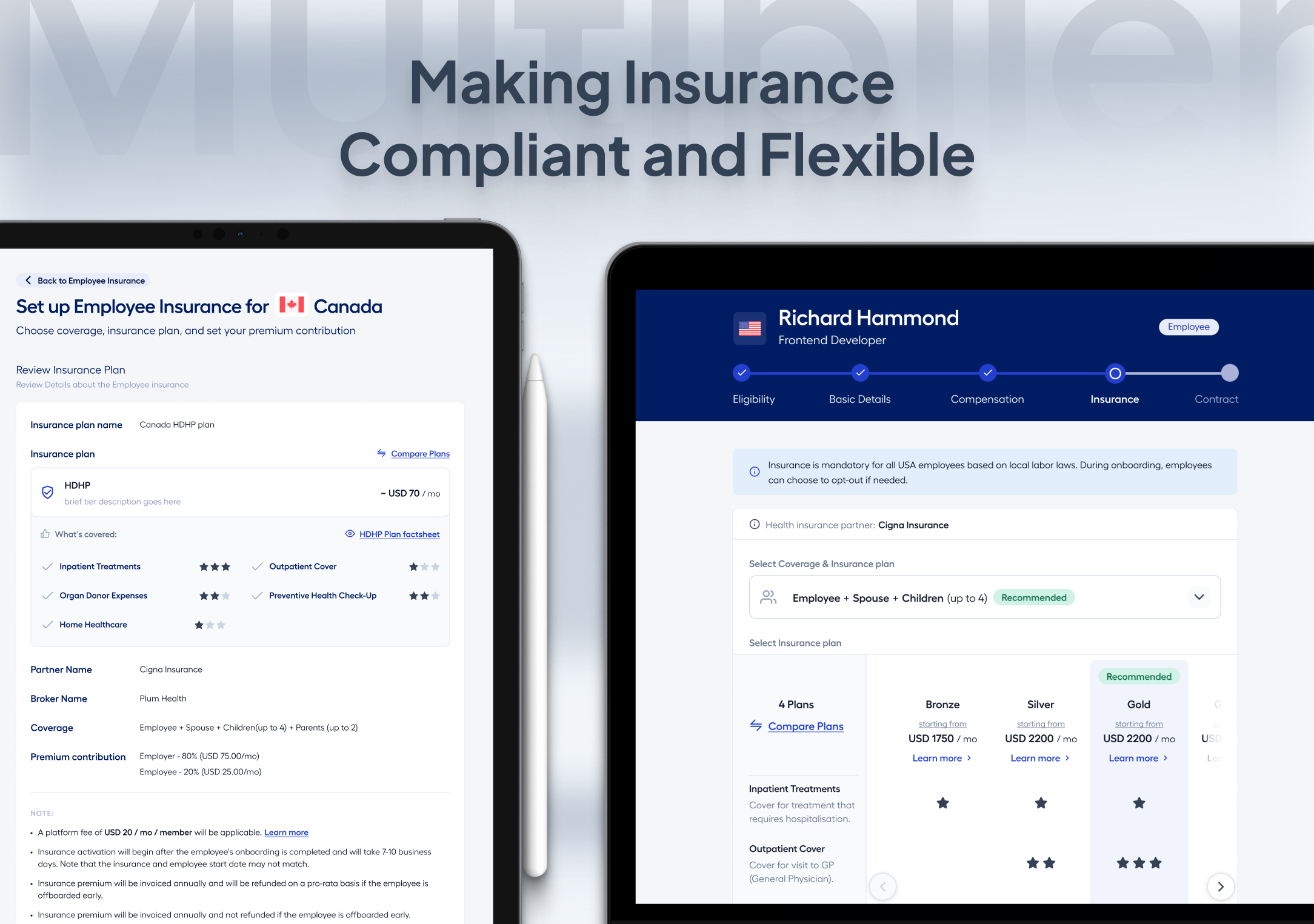
After deciding to enroll, users could explore available plans and add-ons with detailed
comparisons and make informed choices based on their needs.
4. Designed for
automation, not just interaction
A key focus was reducing manual intervention across the system.
I introduced:
automated validation checks to prevent incorrect data entry
system-triggered notifications for updates and actions
automated sync with payroll systems and insurance partners
This ensured that once
users completed an action:
downstream processes were handled without manual follow-up
The goal was to remove ops from routine workflows, not just make
them faster.
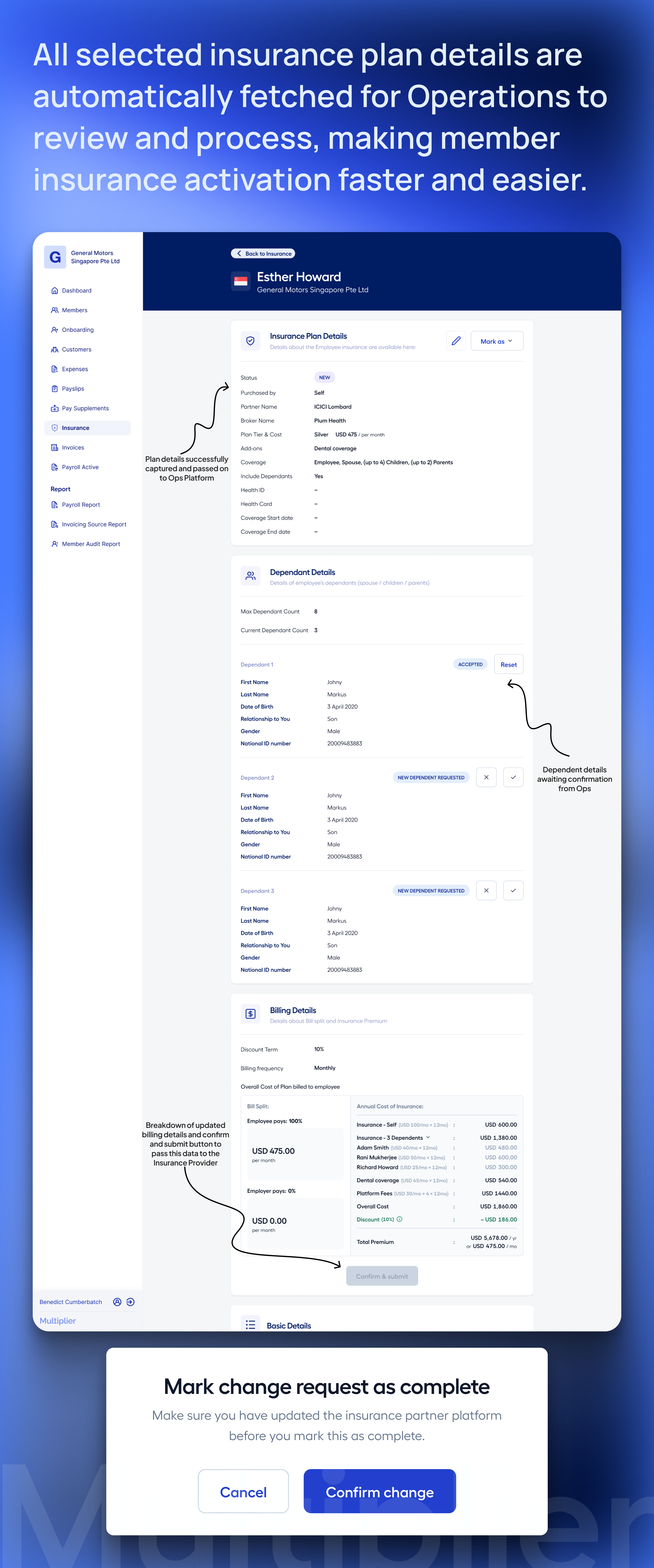
Operations previously had to manually process insurance purchase requests. The new system
automated this, reducing manual work and errors.
After users submitted their insurance choices, the system automatically fetched all
necessary details and processed the enrollment without manual intervention.
5. Created pathways for
revenue expansion
With self-serve in place, I extended the system to support revenue
growth.
I enabled:
plan upgrades based on user needs
out-of-pocket purchases for additional coverage
add-ons and flexible benefit options
These were integrated into
the same self-serve flows, ensuring:
low friction for users
clear visibility into available options
This turned insurance from a fixed offering into an expandable system.
Users were encouraged to explore upgrades and add-ons through targeted banners and
notifications based on their current coverage and needs.
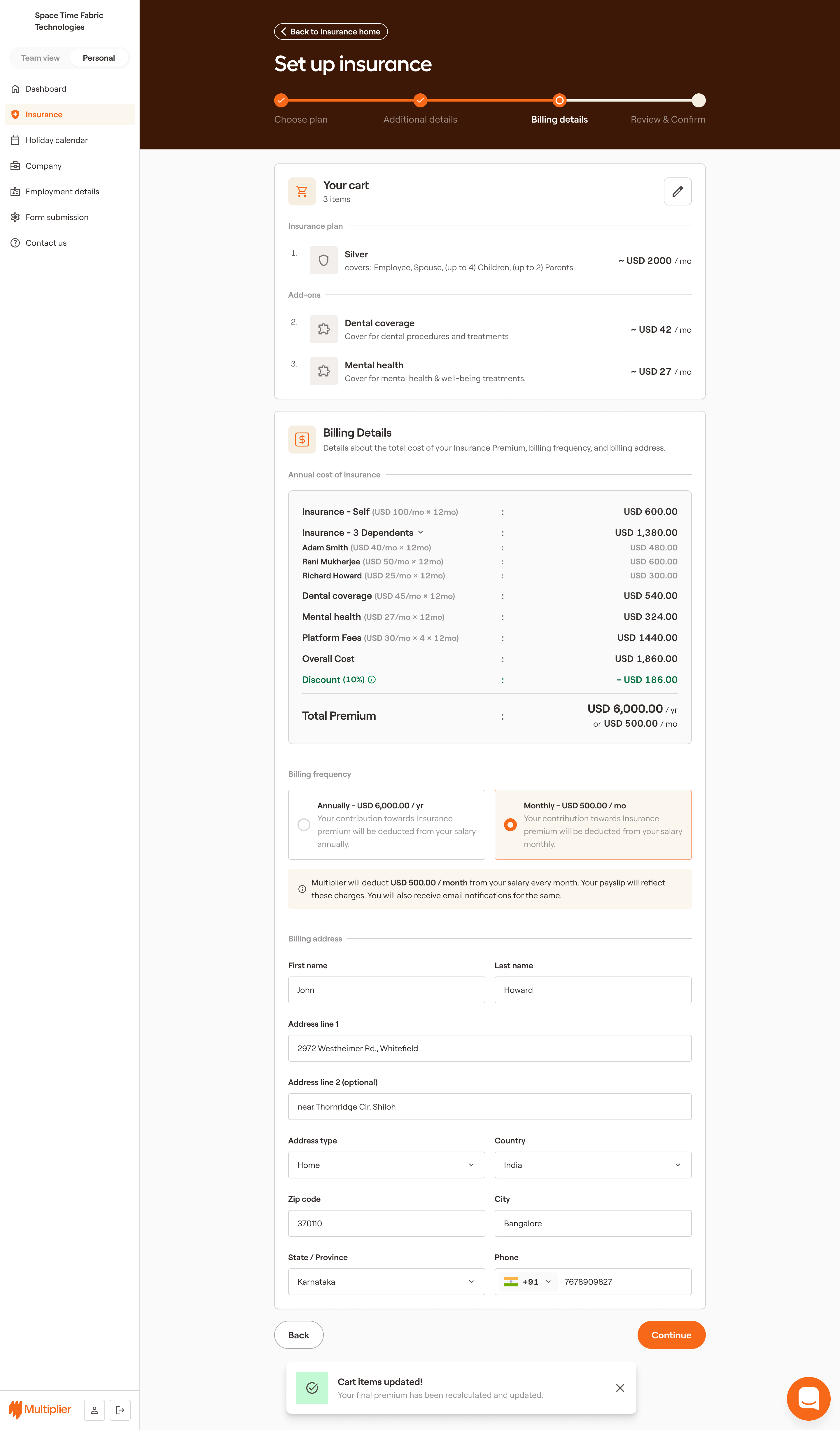
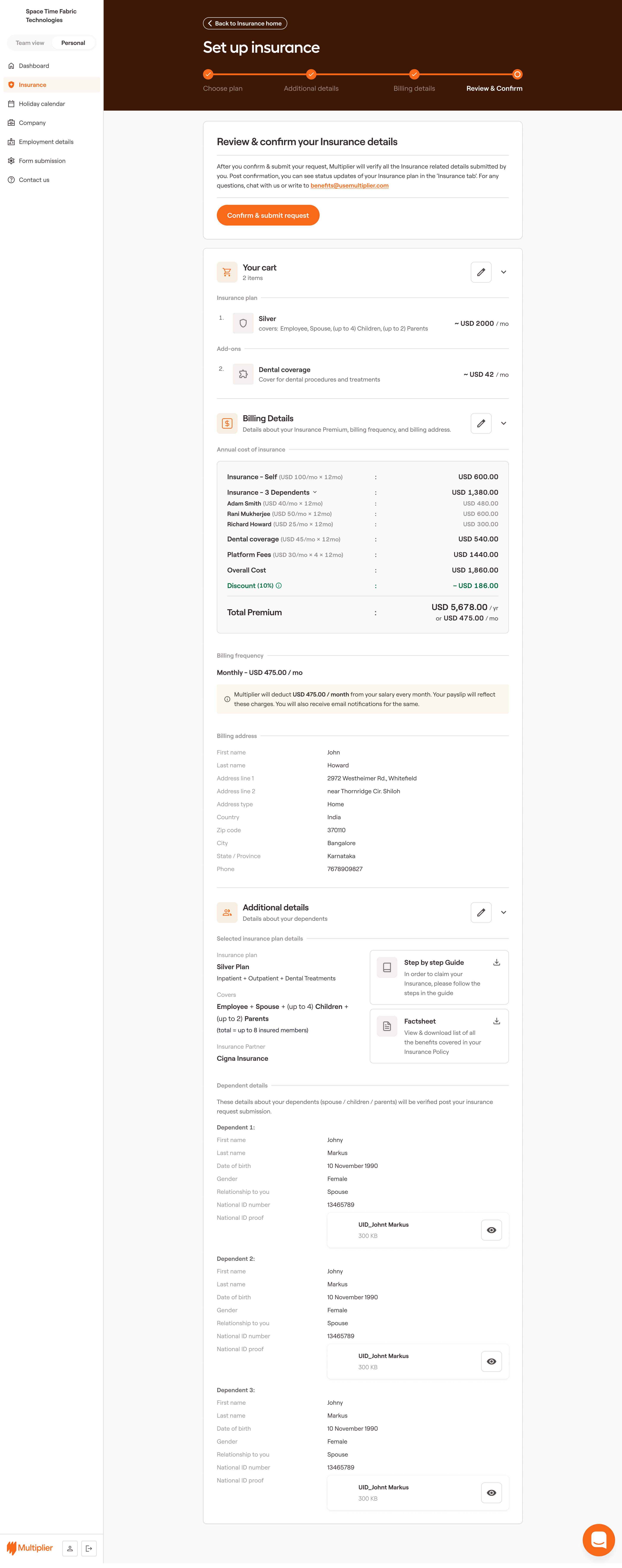
The checkout flow was designed to be seamless, allowing users to easily add upgrades and
add-ons with clear billing details and confirmation.
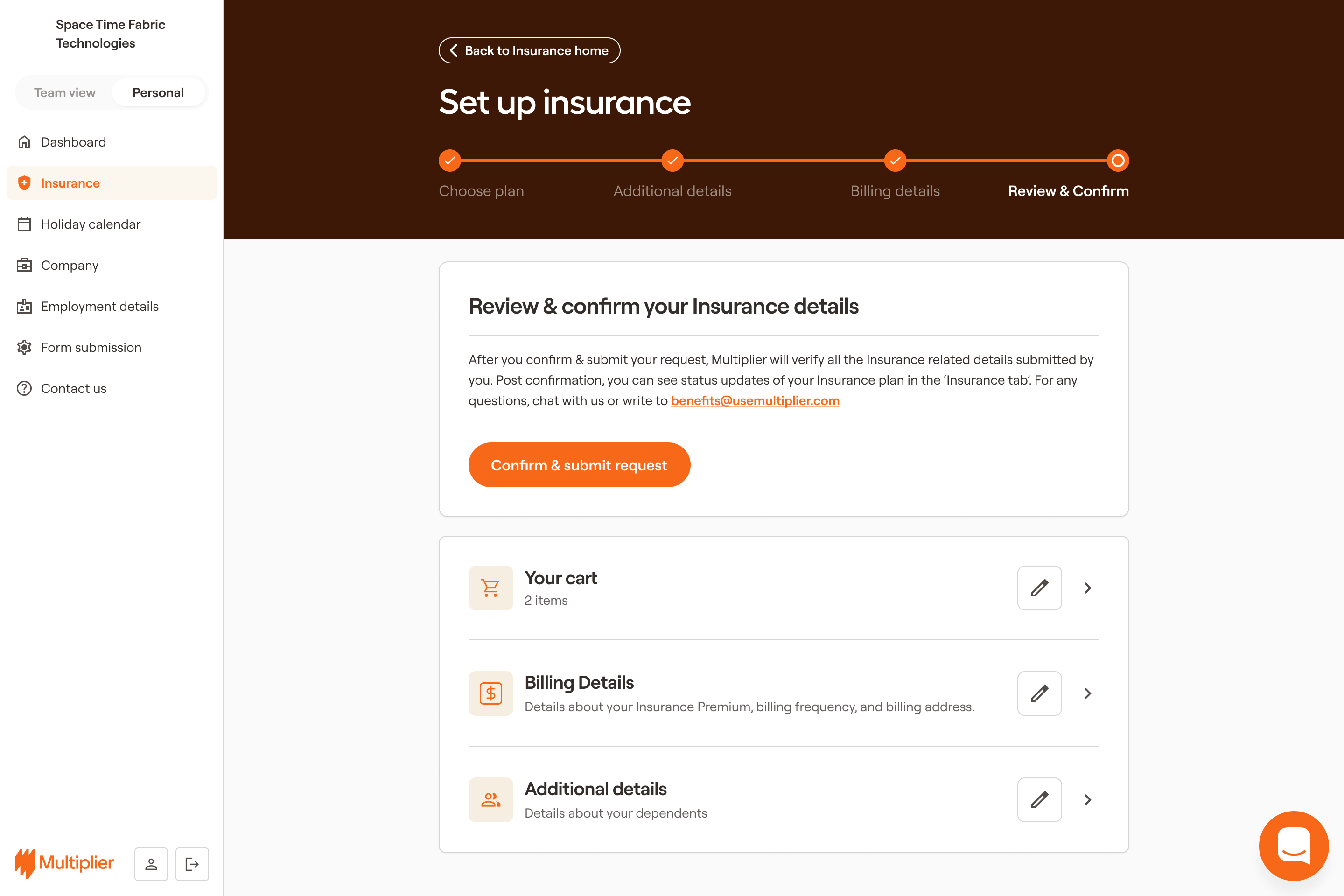
Clear review and confirmation steps were included to ensure users understood their purchases
and any associated costs before finalizing.
Results & Impact
The solution shifted the platform from an ops-driven system to a
self-serve, scalable benefits experience.
Impact Overview
System Shift
Impact
Reach
Self-serve
platform for members
Reduced
operational dependency
45% reduction
in manual effort
Plan upgrades
& out-of-pocket purchases
Revenue growth
~1,850
previously uninsured members
Upsell to
higher coverage tiers
Increased plan
adoption
~3,445 members
on basic plans
Re-engagement
with employer plans
Reduced revenue
leakage
46 opt-out
members
Add-ons and
flexible benefits
Expanded
revenue streams
~6,000 active
members
What Changed at a
System Level
Instead of describing features again, this is what the system now enabled:
Self-Serve as the Default
Behavior
Users can now:
manage dependents
update information
modify plans
without relying on operations.
This significantly
reduced:
support requests
back-and-forth communication
processing delays
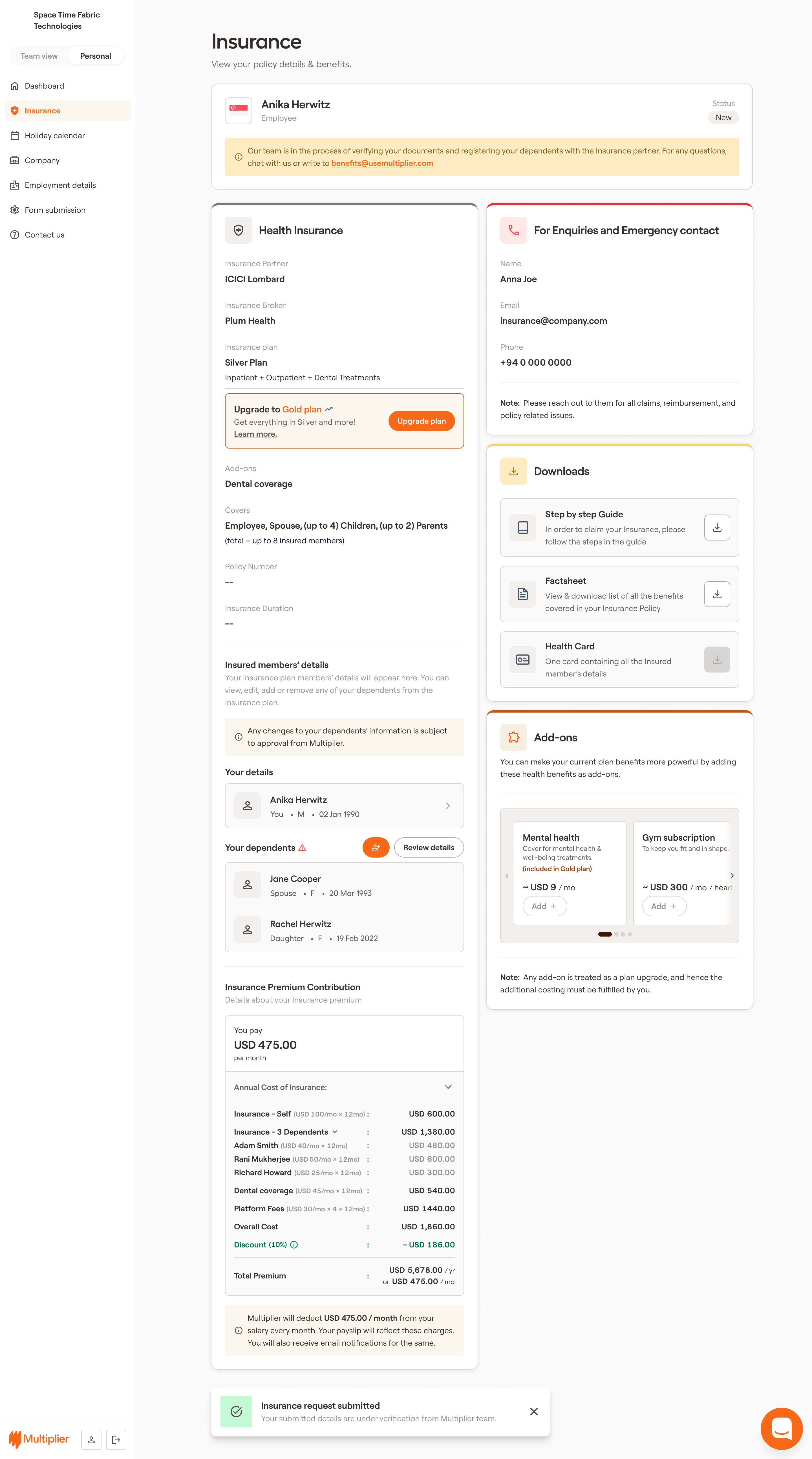
The new dashboard allowed users to manage their insurance details and dependents directly,
reducing the need for support and giving them more control over their benefits.
Data Accuracy Built into the
System
Data validation is now part of the workflow, not a post-facto
correction.
guided forms prevent incorrect inputs
validation rules enforce consistency
updates are verified before syncing
This led to:
fewer claim failures
reduced correction cycles
improved trust in the platform
Guided forms with real-time validation were implemented to ensure users entered accurate
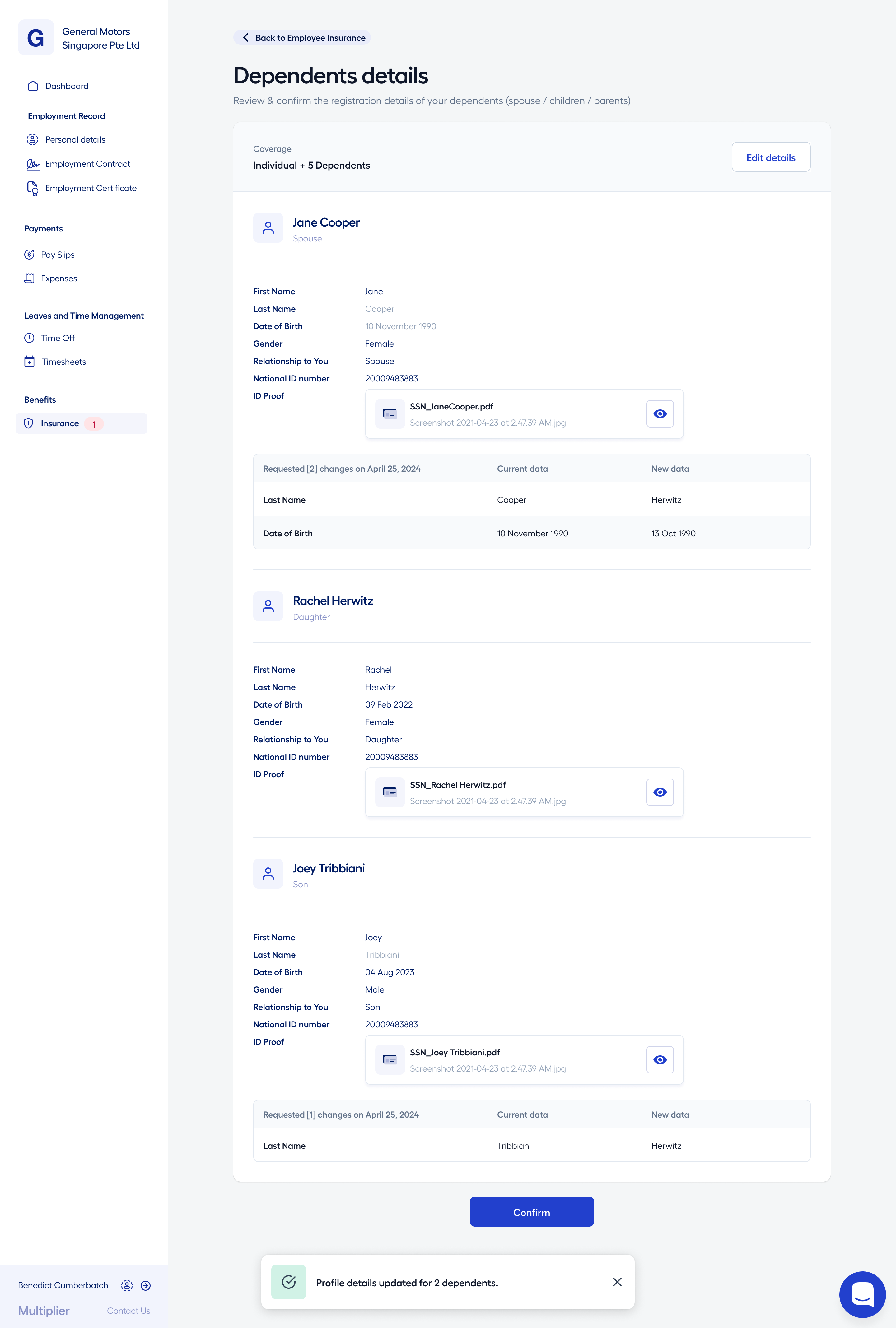
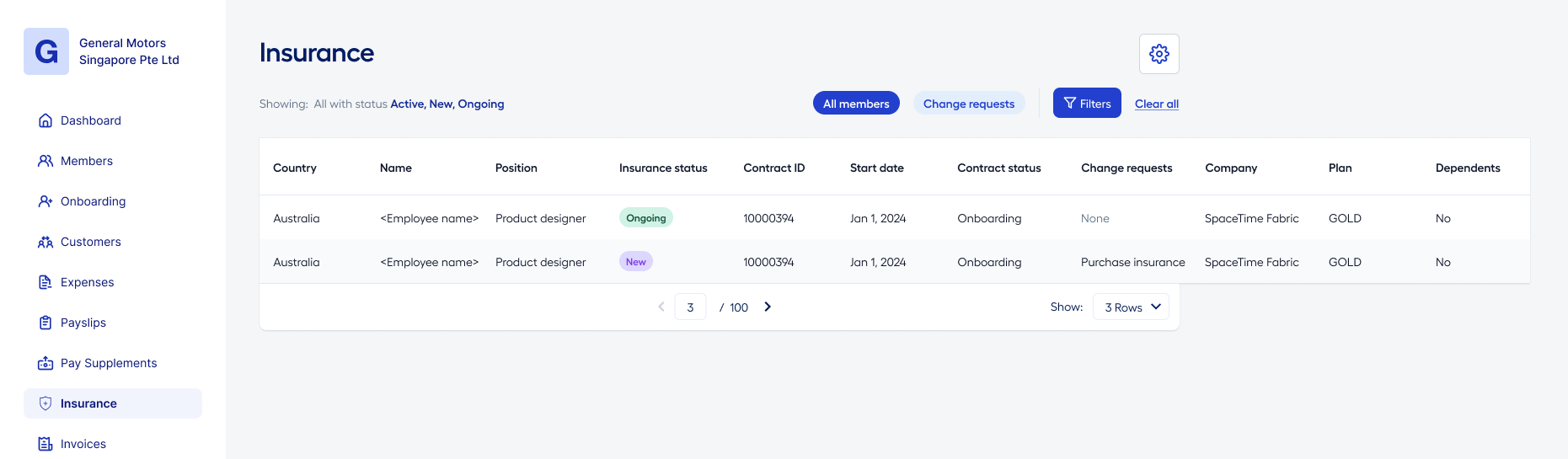
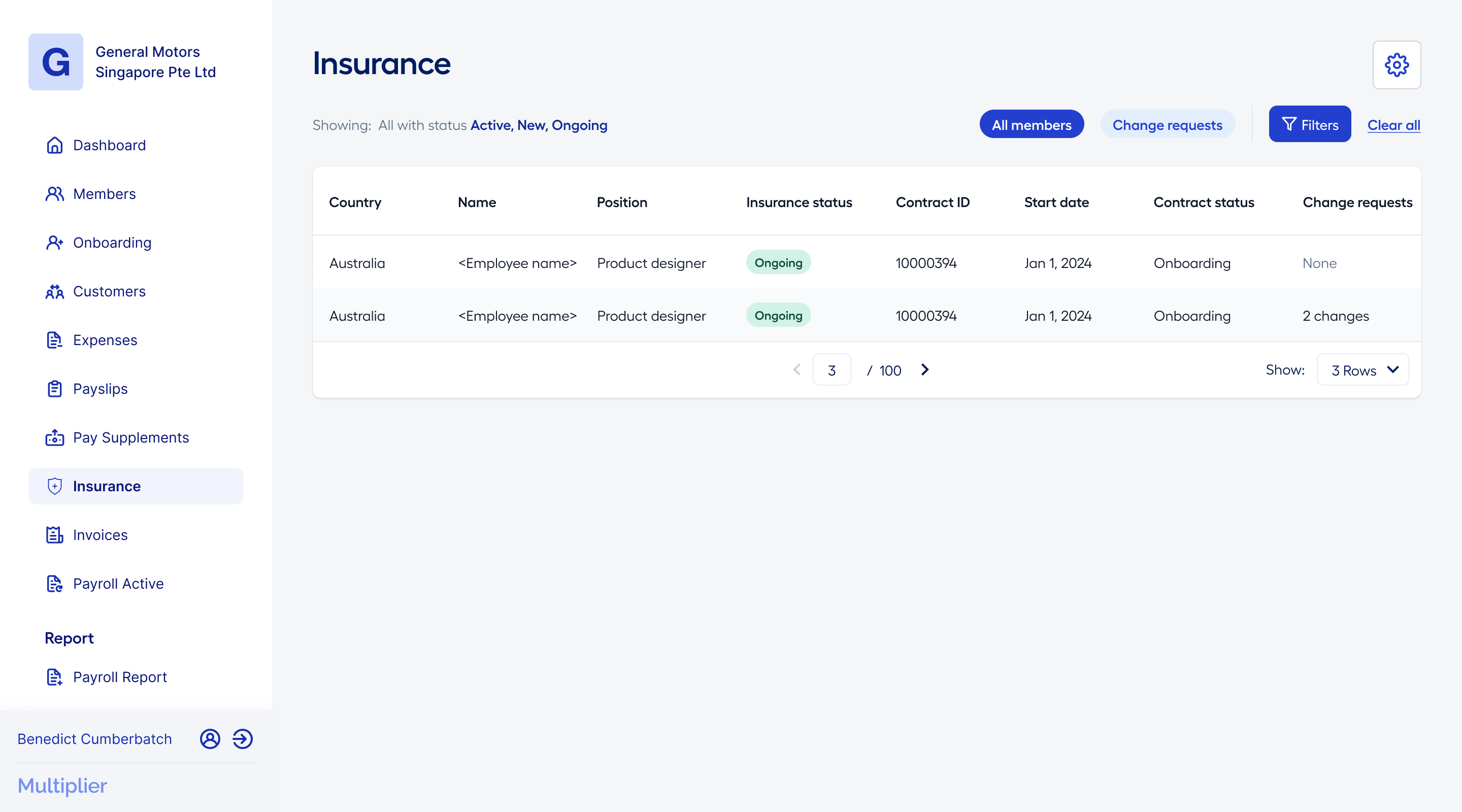
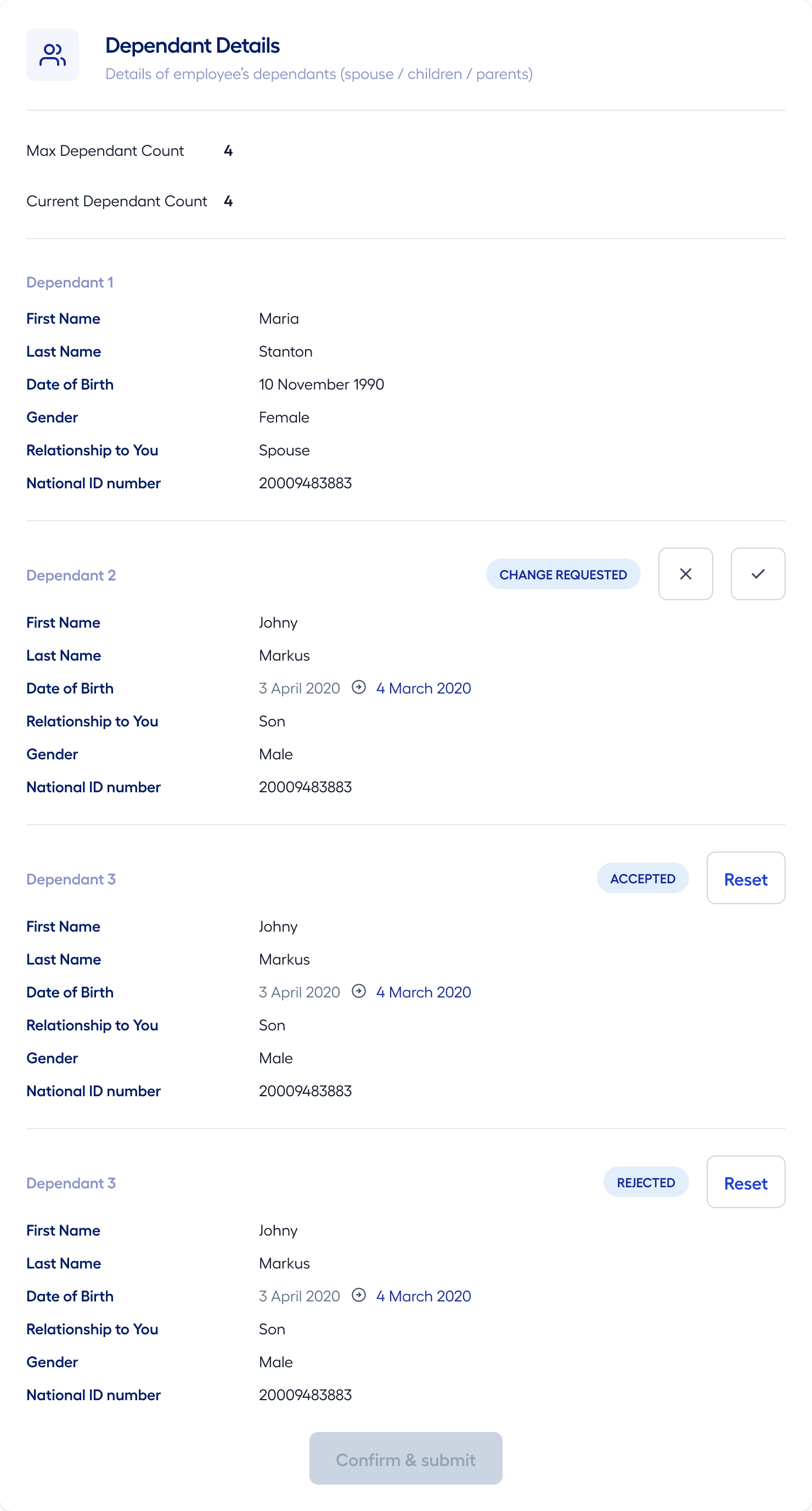
Ops was able to fully manage data change requests through the system, with automated
checks ensuring that all updates were accurate and consistent before being applied.
The system provided a clear review and confirmation step for data changes, allowing ops
to verify updates before they were finalized, further ensuring data integrity.
Plan Management as a
Continuous Experience
Insurance is no longer a one-time decision during onboarding.
Users can:
explore plans
upgrade coverage
purchase add-ons
within the same system.
This enabled:
higher plan adoption
better coverage distribution
incremental revenue growth
Users could easily explore upgrade options and add-ons directly within the platform, making it simple to enhance their coverage as their needs evolved.
The system guided users through any additional details required for upgrades or add-ons, ensuring a smooth and informed process.
A comprehensive review and confirmation step was included to ensure users understood the changes they were making to their plans and any associated costs before finalizing their purchases.
After completing a purchase or upgrade, users received a clear confirmation screen with all relevant details, reinforcing their confidence in the platform and their coverage choices.
Measurable
Outcomes
Operational
Impact
45% reduction in operational overhead
significant drop in manual requests and support load
Revenue Impact
~$2.8M opportunity unlocked from uninsured
members
increased plan upgrades and add-on purchases
User Experience
faster updates and fewer delays
fewer claim rejections
improved user trust and confidence
Reflection
This project fundamentally changed how I think about system design.
Efficiency doesn’t come from faster operations — it comes from
removing the need for operations altogether.
By shifting control to users while maintaining guardrails through
validation and automation, we were able to: